Primary trade: Instrumentation and controls technicians · Skill level: Intermediate apprentice · Lesson classification: Troubleshooting · Estimated reading time: 10 minutes
What you will learn: How to separate a command problem from a positioner, air-supply, actuator, linkage, or mechanical-travel problem when a control valve stops before the commanded position.
The control room calls and says a valve is commanded fully open, but the position display has stopped below full travel. It is tempting to blame the positioner immediately. That guess can waste time because a control valve is a chain: a command reaches the instrument, the instrument meters air, the actuator turns that air into force and motion, the linkage transfers the motion, and the valve assembly reaches an actual position. A failure at any boundary can produce the same short-travel symptom.
This lesson teaches a diagnostic sequence, not an energized or pressurized maintenance procedure. Coordinate with operations, follow the approved work permit and isolation plan, and use the exact valve, actuator, and positioner instructions. Do not loosen tubing, linkage, packing, actuator parts, or travel stops on an operating valve unless the approved procedure specifically authorizes that work.
What “stops short” actually tells you
“Stops short” means the reported or observed travel does not reach the expected value for the command being applied. It does not, by itself, prove that the valve is sticking. The indication may be wrong, the command may never reach the positioner, supply pressure may be inadequate for the installed actuator and service, the pneumatic output may not change correctly, linkage may be loose or misadjusted, a configured travel limit may be active, or the valve and actuator may be resisting motion.
Start by defining the expected response from approved information. Confirm the tag, fail action, direct or reverse action, calibrated travel, signal range, characterization, and any configured travel limits. A 20 mA command does not universally mean the physical valve must be open; the configured action and application determine the expected direction. The diagnostic question is always: “What should this assembly do according to its approved data, and what is it doing now?”
Follow the chain instead of guessing
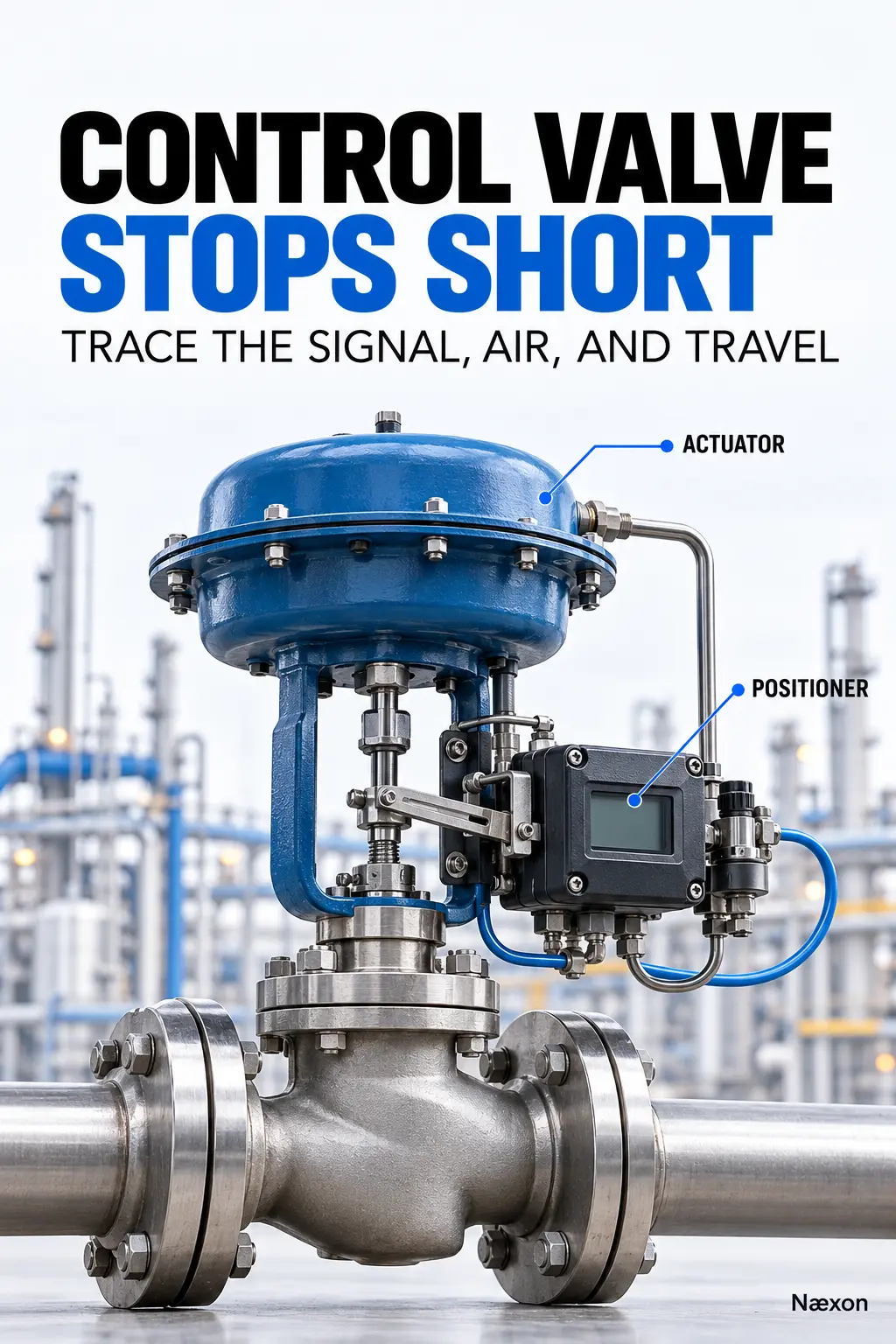
Figure 1 shows the useful order. Check the command at the device, then the positioner response, then pneumatic output, actuator motion, and finally actual valve travel. A correct reading at one point proves only that point. For example, a correct input current at the positioner does not prove that its pneumatic output is correct, and correct actuator movement does not prove that the process response will follow.
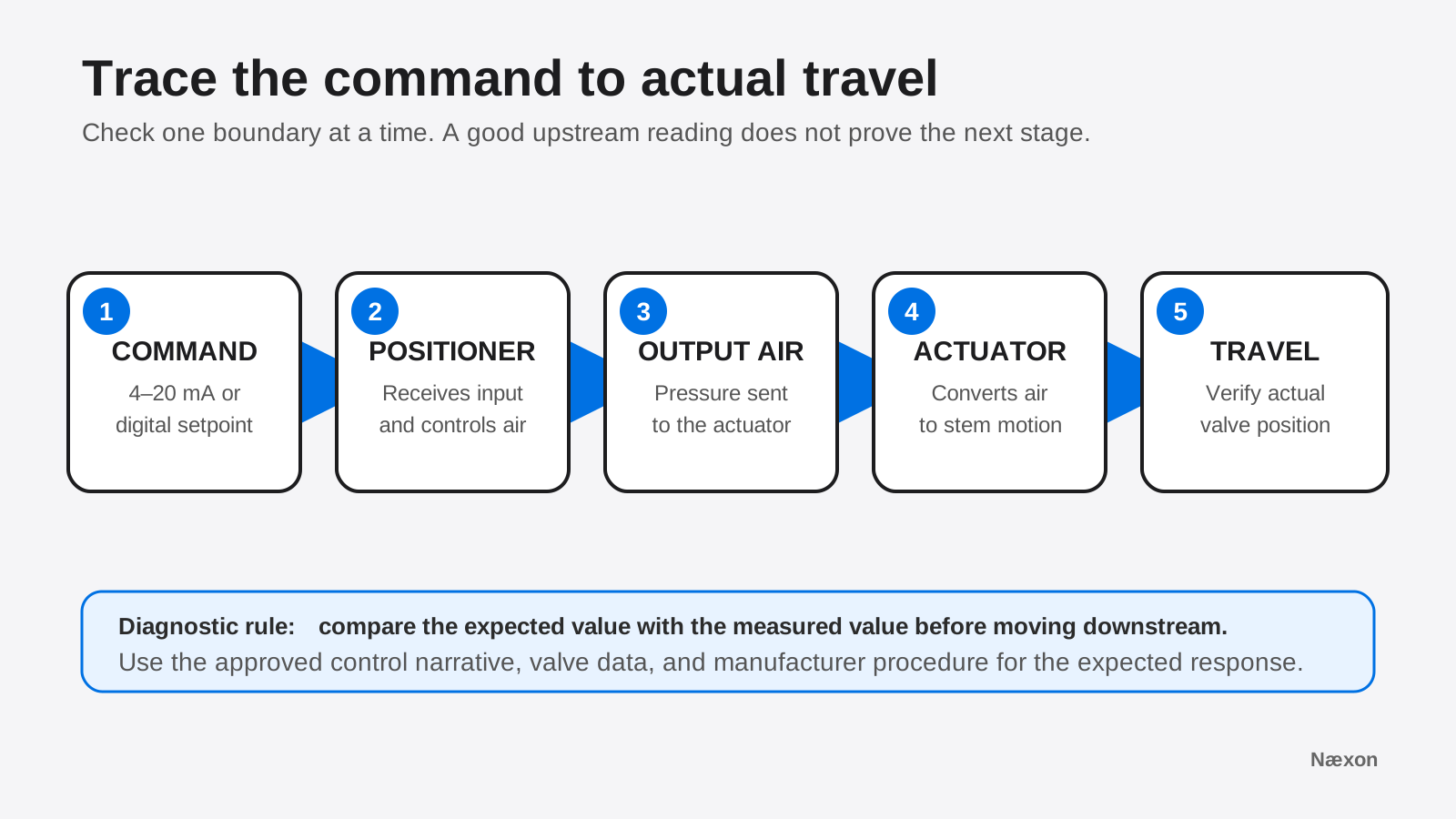
A safe step-by-step diagnostic method
- Confirm the complaint. Record the command, indicated travel, process condition, alarm text, direction of movement, and whether the problem is repeatable. Do not stroke a valve merely to reproduce a report without operations approval.
- Verify identity and expected action. Match the field tag to the control narrative, loop information, valve data, and device configuration. Confirm which direction the valve should travel as the command rises.
- Check the command at the positioner. Compare the control-system output with the current or digital setpoint actually received by the device. Use an approved process meter or communicator and the manufacturer’s connection method.
- Check supply and pneumatic output. Compare instrument-air supply and positioner output with the device and actuator requirements. Look for a closed isolation valve, restriction, leakage, water, damaged tubing, or a regulator problem without disturbing a live process connection.
- Compare setpoint with travel. A positioner that receives the correct setpoint but reports persistent travel deviation has narrowed the problem to the device output, actuator, linkage, feedback, or valve assembly.
- Inspect mechanical transfer. Under the required safe condition, inspect feedback linkage, fasteners, travel stops, handwheel position, actuator stem connection, and visible interference. Escalate packing friction, internal damage, galling, or actuator work to qualified personnel.
This sequence moves from information to energy to motion. It also protects against the common mistake of adjusting calibration before proving that the command, air, and mechanics are sound.
Worked example: quantify the shortfall
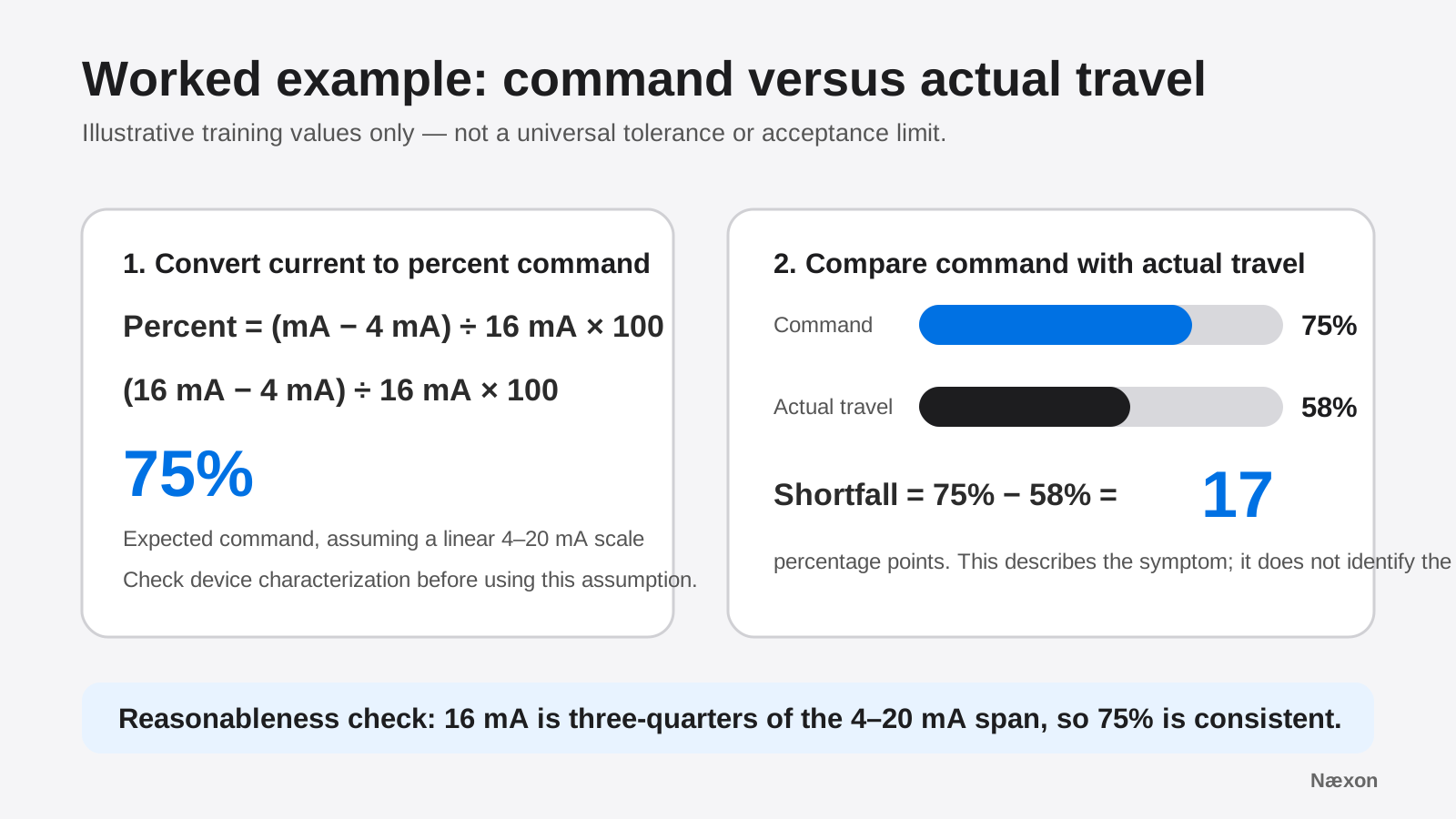
Assume an illustrative linear 4–20 mA command. The device receives 16.00 mA, the configured command display agrees, and actual travel feedback is 58%. Define I as measured input current in milliamps. The command percentage is (I − 4 mA) ÷ 16 mA × 100. Substituting the measured value gives (16 mA − 4 mA) ÷ 16 mA × 100 = 75%.
The observed travel shortfall is 75% − 58% = 17 percentage points. Units matter: this is a difference between two percentages of calibrated travel, not 17% of the 58% reading. The reasonableness check is simple: 16 mA is 12 mA above the 4 mA live zero, and 12 mA is three-quarters of the 16 mA span, so a 75% command is consistent.
These values are training assumptions, not project acceptance criteria. A characterized or reverse-acting configuration may map signal and travel differently, and the permitted deviation or timing must come from the approved procedure and device configuration.
Read the pattern of evidence
If the control system commands 75% but the positioner receives a different value, stay upstream: verify the output channel, wiring, scaling, and loop before touching the valve. If the correct command reaches the positioner but its setpoint or output does not respond correctly, check configuration, instrument condition, and diagnostics using the approved manual.
If the command and pneumatic output change but the actuator barely moves, investigate the air path, actuator condition, linkage, travel stops, handwheel, and mechanical resistance. If commanded travel and measured travel agree but the process variable moves the wrong way or hardly changes, the valve may not be the first fault. Verify the process, transmitter, flow path, upstream and downstream conditions, and whether the trim is actually influencing the process as expected.
Digital valve controllers may expose input current, setpoint, travel, travel deviation, supply pressure, and output pressure as separate variables. That separation is valuable: it lets a technician identify where the expected response first disappears. Use only variables available on the installed device and do not assume one model’s menu, alert, or threshold applies to another.
Incorrect approach versus correct approach
The incorrect approach is to see 58% travel, enter calibration, and force the reported position toward 75%. That can hide a weak air supply, loose linkage, active limit, incorrect feedback, friction, or actual mechanical obstruction. It may make the display agree while the physical problem remains.
The correct approach is to preserve the as-found condition, document command and feedback, verify expected action, and check each boundary in order. Calibration becomes appropriate only after the approved procedure shows that the device is safe to stroke and the signal, supply, actuator, linkage, and mechanical condition support calibration.
Common mistakes
One mistake is treating the control-room percentage as a direct measurement of stem position. It may be the command, a calculated value, or separate position feedback; identify which signal is displayed. Another is reading a supply gauge and assuming adequate flow is available while the valve moves. A restriction can allow normal static pressure but poor dynamic response. A third is using an arbitrary pressure, travel deviation, torque, or acceptable error from another valve. Those values are assembly- and project-specific.
Technicians also lose the as-found evidence by cycling power, running auto-calibration, or moving linkage before recording the symptom. Preserve command, travel, pressures, alerts, configuration, and operating conditions first. That evidence often makes the difference between fixing the cause and merely resetting the complaint.
Field Rules
- Define expected valve action from approved data before judging the response.
- Trace command, air, motion, and travel in order.
- A correct upstream value does not prove the downstream stage.
- Record the as-found condition before changing configuration or calibration.
- Never invent a universal supply pressure, travel tolerance, or acceptance limit.
- Stop when the work requires process isolation, actuator disassembly, packing adjustment, or internal valve work beyond your authorization.
Knowledge Check
- A controller shows 80% command, but the positioner receives 12 mA on a linear 4–20 mA input. Which part of the chain should be checked first?
- The positioner receives the correct command and reports increasing output pressure, but stem travel does not increase. Name two downstream areas to inspect under the approved safe condition.
- For a linear 4–20 mA command, what percent command does 10.4 mA represent?
- Command and actual travel both read 60%, but process flow is unexpectedly low. Why is recalibrating the positioner not the first step?
Answers
1. Start upstream of the positioner. Twelve milliamps represents 50% on a linear 4–20 mA scale, so the received command does not agree with the controller’s 80% indication. Check output scaling, the analog channel, wiring, and the meaning of the displayed value.
2. Inspect the pneumatic path and actuator, then the mechanical linkage, travel stops, handwheel, and visible interference as authorized. Correct input with changing output pressure moves the investigation downstream of the electrical command.
3. (10.4 mA − 4 mA) ÷ 16 mA × 100 = 40%. The difference is 6.4 mA; 6.4 divided by the 16 mA span is 0.40.
4. Agreement between command and travel suggests the valve-position chain is following the requested position. Verify the process conditions, transmitter, flow path, and whether the valve is affecting the process before changing position calibration.
Practical Exercise
On paper, draw five boxes labeled Command, Positioner, Output Air, Actuator, and Actual Travel. Use this training scenario: command 16 mA, setpoint 75%, actual travel 58%, supply pressure within the installed device’s approved requirement, and positioner output pressure increasing. Mark the first confirmed mismatch and write the next two checks you would request under the site procedure.
A correct result identifies the mismatch between setpoint and actual travel, preserves the command and air readings as evidence, and sends the next checks toward actuator motion, linkage, configured limits, feedback, and mechanical resistance. It does not prescribe a live stroke, adjustment, or disassembly.
Related learning
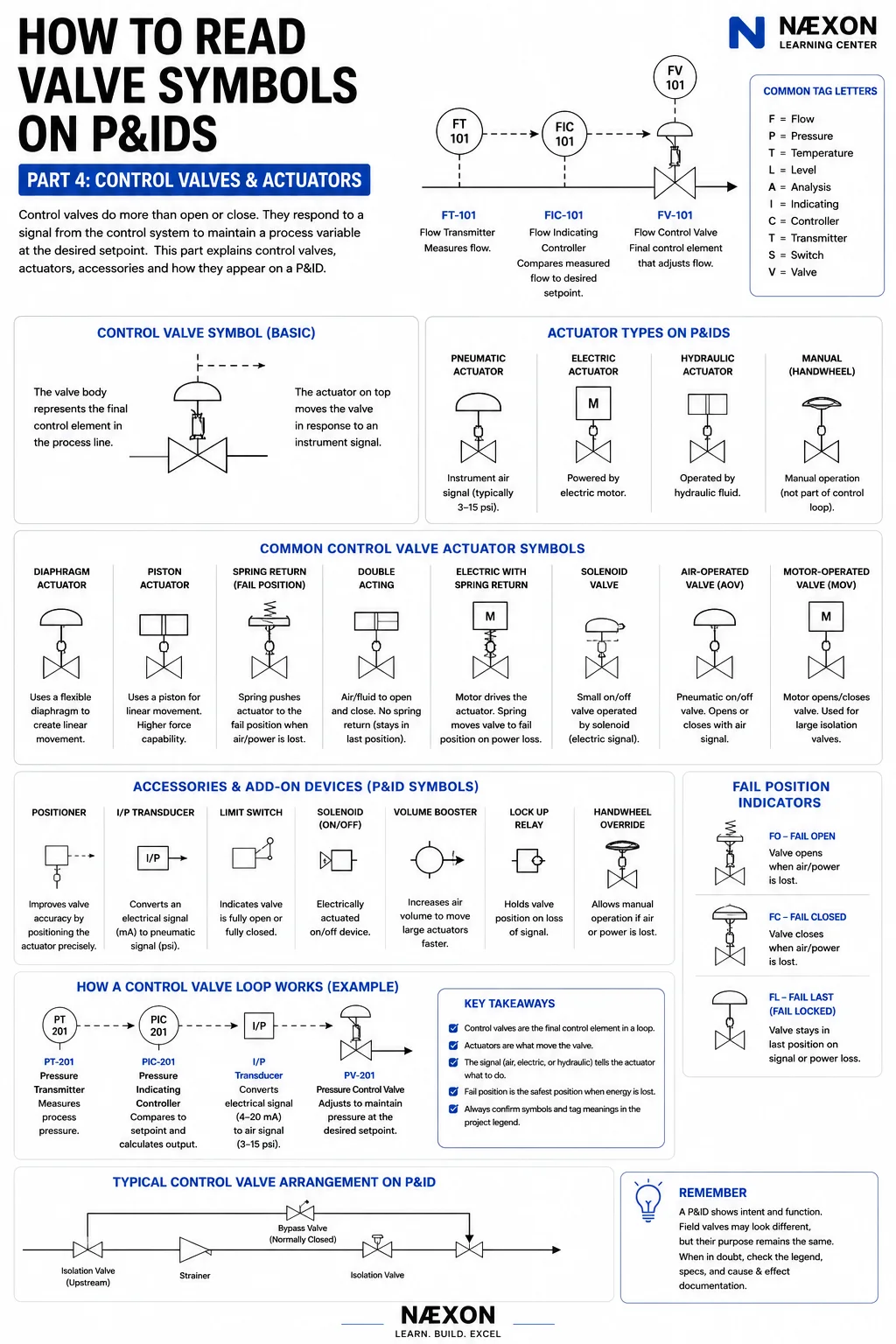
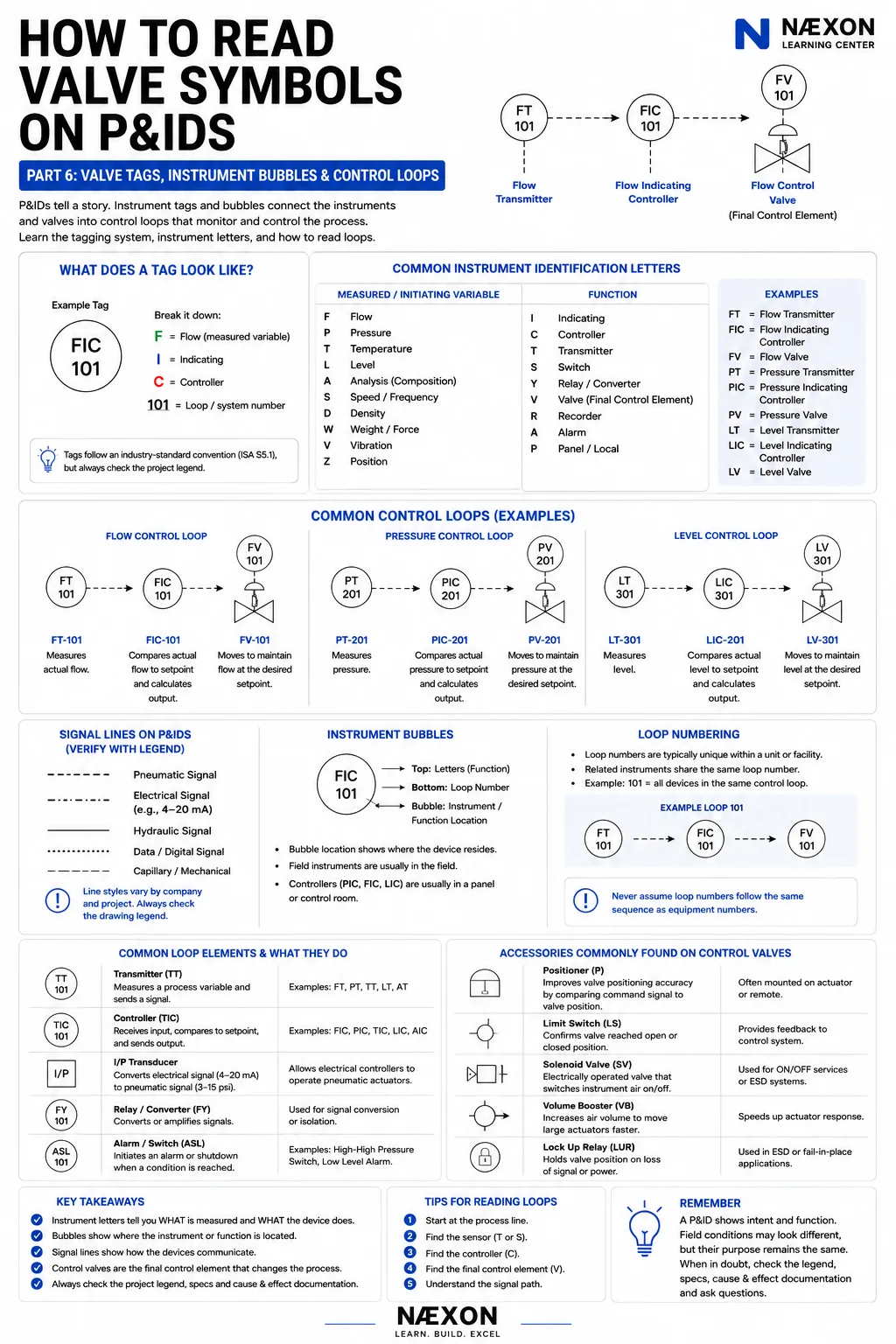
Review 4–20 mA loop troubleshooting fundamentals before diagnosing the command side. The deeper lesson on a signal that disagrees between the field and control room helps separate wiring and scaling problems. For drawing context, continue with control-valve and actuator symbols on P&IDs and normally open, normally closed, and fail-position notation.